


Popl: AI Lead Capture
4.81.24K Reviews
App Specs
- Version
- 8.15.0
- Updated On
- License
- Free
- Downloads
- 500,000+
- Developer
- Popl Co
- Categories
- Business
- Platform
- Android
Screenshots
 Analysis by AppCompare
I tend to judge a networking app by what happens when a conversation is moving quickly: can I share my details without making the other person wait, and can I still make sense of the contact later? That is the practical question behind Popl: AI Lead Capture. It is a free business app from Popl Co, with a 4.8 average across around 16,000 ratings and more than 500,000 installs. Those figures suggest a sizeable audience, but what matters to me is whether the app fits the way you actually meet people.
Who gets the most from a digital card
I see the clearest use for people whose work depends on meeting new contacts repeatedly: independent consultants, recruiters, founders, salespeople, and event staff. If your details change often, or you would rather share a profile than carry and replenish printed cards, a digital card can be a convenient default. Popl is less compelling if you rarely exchange professional details or if you need a simple, offline record of contacts and nothing more.
It also helps to decide what you want the exchange to accomplish. A digital profile can make it easy to share contact information, but it does not replace a thoughtful introduction. I would treat the app as a way to remove the awkward card shuffle, not as a substitute for asking what the other person is working on or writing down why I wanted to follow up.
Readable profiles and a sensible setup
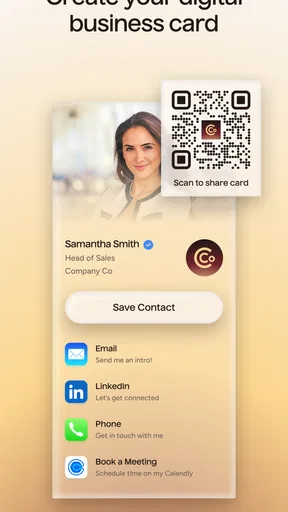
The first task is to make the profile useful at a glance. I would put the details someone needs to continue the conversation ahead of less relevant links, and keep the profile focused on the work I do now. That matters especially when someone opens it in a busy setting and has only a moment to understand who I am. A polished profile is not necessarily a long one; too many options can make the next step less obvious.
The app’s appeal depends partly on how comfortable you are managing information on a phone. Its interface is described as clean and user-friendly in the original review, and a short setup can make the first exchange feel straightforward. Still, interface comfort is personal: I would take a few minutes before an event to check that the important fields are correct and that I can find them without hunting through menus. That small rehearsal is more useful than discovering a missing detail while someone is waiting.
Different ways to take part in an exchange
Not everyone wants to use a phone in the same way. Some people are comfortable with a quick tap; others would rather show a profile or share details in a less hands-on way. The original experience describes tap-to-share and says the recipient does not need the app installed. In practice, I would still keep an ordinary fallback ready: say my name clearly, offer a printed card if I carry one, or ask the other person which method is easiest for them.
That flexibility matters for motor and sensory comfort. Reaching toward another person’s phone, aiming a device, reading a screen in glare, or handling a phone while carrying bags can all make an otherwise simple exchange awkward. I would never assume that a tap is the easiest choice for the person across from me. Asking “Would you prefer to scan or take my details another way?” makes the interaction more considerate and avoids turning a digital feature into a social hurdle.
Worth Reading Before You Choose

Flipboard Shows What News Apps Must Do Beyond the Feed

Switching to Android Auto Means Rethinking Your Driving Routine

Google Calendar Makes a Crowded Week Easier to Manage

Ludo King Makes the Most of the Minutes Between Plans

Baby Panda World Brings Quick Play to Modern Phones, but Its Game Library Feels Busy

ESPN’s Live Game View Makes Following Close Games Easier
When the room, phone, or connection gets in the way
Networking does not happen only at a quiet desk. At a crowded conference, a loud venue, or a reception with poor lighting, I may have only a few seconds to exchange details. In those moments, a prepared profile and a familiar sharing method can save time; a last-minute sign-in or profile edit can do the opposite. Before leaving, I would check that my contact information is current, open the app once, and make sure I know how I want to offer it.
For a useful everyday example, imagine meeting a potential client between sessions. I would share the profile, then add a brief note to my own follow-up routine about the project they mentioned, rather than relying on memory at the end of the day. That note is what makes a contact actionable. A digital card can help with the handoff, but the value of the lead still depends on what I remember and do afterward.
There are also settings where a phone-based exchange is a poor fit: a workplace that restricts phone use, a conversation with someone who does not want to share details digitally, or a venue where devices are inconvenient. In those cases, a paper card or a direct exchange of email addresses may be more respectful and dependable. I would use Popl as one option in my networking kit, not the only one.
Lead capture is only as useful as the follow-through
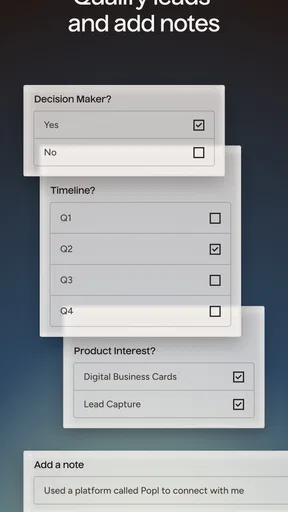
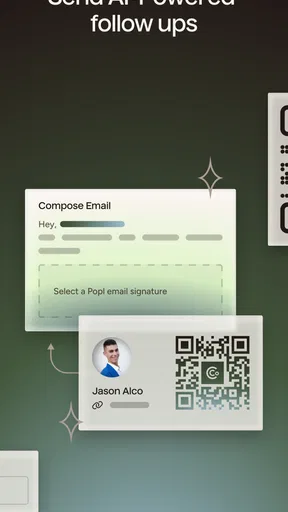
The original review describes AI-assisted organization and prioritization, plus suggestions intended to help with follow-up. I would treat those suggestions as prompts, not instructions. A suggested time can be a useful reminder to revisit a lead, but I would base the actual message on the conversation and the other person’s preferences. The app can help structure a process; it cannot reliably supply the context that makes a follow-up feel personal.
One practical habit is to separate “met” from “worth contacting soon.” If every new person becomes an urgent lead, prioritization stops helping. I would review new contacts after an event, decide which conversations merit a next step, and write a short reason for each one. That gives any organization tools something meaningful to work with and reduces the risk of sending a generic note simply because a contact is in the app.
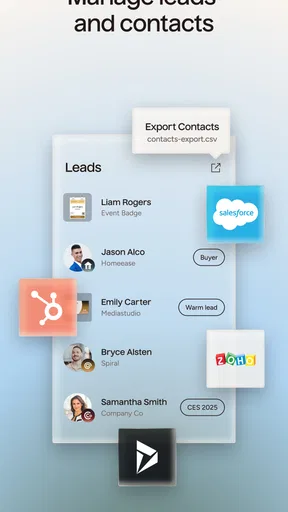
The CRM connections mentioned in the original review may be useful for someone whose team already has a defined customer-record workflow. Before relying on a sync, I would check which details should live in the app and which belong in the team’s CRM, then test the process with a contact I can verify. Duplicate records and incomplete notes can create more cleanup than the original card exchange, so a little setup discipline pays off.
Where the trade-offs become important
A digital profile is not automatically better than a printed card. Paper works without asking anyone to unlock a phone, understand a new interface, or choose a digital channel. It is also easy to hand over discreetly. Popl’s advantage is convenience for people who want their information on hand and expect to follow up digitally; the paper alternative can be better for brief, formal, or low-connectivity encounters.
There is a similar trade-off with ordinary contact sharing through a phone. A direct email or number exchange is familiar and gives both people a clear next step, while a profile can present more context in one place. If the recipient only needs one detail, a full profile may be more than the moment calls for. I would choose the smallest exchange that serves the conversation rather than sharing every available link by default.
The app is free to download, with optional in-app purchases ranging from $2.99 to $144.99 per item. I would begin with the free experience and only consider paying if a specific paid capability solves a repeated problem in my workflow. That range makes it especially sensible to check what is included before committing, rather than assuming that every feature described in a review is available without an extra purchase.
What’s the Buzz About?
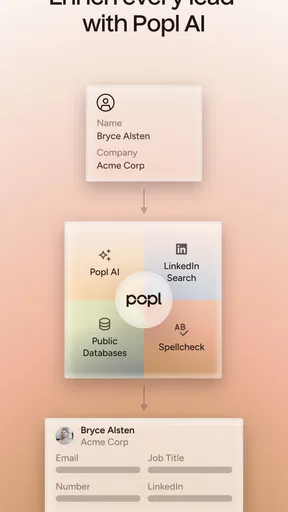
Popl: AI Lead Capture is essentially a smart business card app on steroids. Gone are the days of fumbling through piles of paper cards or losing an important contact. With Popl, everything you need is right on your phone. It uses advanced AI to not only capture leads but also to help you manage them efficiently.
Setup and First Impressions
Getting started with Popl was surprisingly easy. You download the app, set up an account, and you’re good to go. The interface is clean and user-friendly, which is always a plus. You can customize your profile with your contact details, social media links, and even a snazzy photo.
What caught my attention was the app's ability to share your information with just a tap. It's like magic! You don’t even need the other person to have the app installed. Just tap your phone against theirs, and voilà, your details are transferred. It's almost like having a digital handshake.
Features That Stand Out
One of the standout features of Popl is its AI-powered lead management. It doesn’t just stop at capturing contacts. The app helps you categorize and prioritize your leads, making follow-ups a breeze. The AI even suggests the best times to reach out, based on past interactions. It's like having a personal assistant in your pocket.
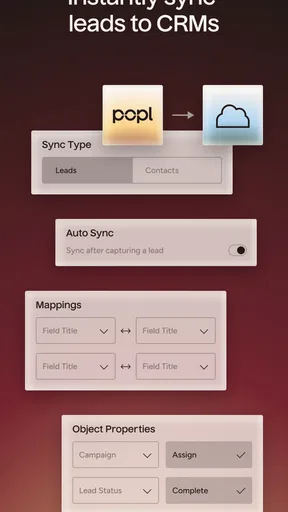
Another neat aspect is the integration capabilities. Popl connects seamlessly with popular CRM tools, which is a huge advantage for anyone serious about managing leads and clients efficiently. You can sync your contacts and notes with apps like Salesforce, HubSpot, and more.
Real-World Application
Let’s face it, many apps promise to revolutionize networking but fall short in real-life scenarios. However, Popl seems to live up to its claims. I tried it out at a networking event, and it was a hit. Not only did it save me the hassle of carrying physical cards, but it also made exchanging information quick and painless.
Plus, the app’s analytics feature provided insights into which contacts were engaging with my profile, allowing me to tailor my follow-up strategies. It’s like having a crystal ball for networking success.
Things to Keep in Mind
While Popl is packed with features, it’s not without its quirks. The AI suggestions, although mostly accurate, sometimes felt a bit off. It’s not a dealbreaker, but something to be aware of. Also, while the app is free to download, some advanced features require a subscription. It’s worth considering if you’re planning to use it extensively.
Another point worth noting is the battery usage. The app can be a bit of a power drain if you’re using the NFC feature frequently. Make sure your phone is fully charged before heading to that big conference!
Final Thoughts
Overall, Popl: AI Lead Capture is a solid choice for anyone looking to streamline their networking efforts. Whether you’re a sales professional, entrepreneur, or just someone who loves making connections, this app is definitely worth checking out. It combines the old-school charm of a business card with the modern convenience of technology.
The current version is 8.3.2, and the app has been available since April 8, 2020. Its Teen age rating is worth keeping in mind if a younger person is setting it up, especially when deciding what professional contact details to put on a public-facing profile. I would review each field before sharing and keep personal information separate from what I use for work.
So, if you’re ready to step up your networking game and leave a lasting impression, give Popl a try. It might just be the digital companion you didn’t know you needed.
Pros
- Easy integration with existing CRM systems.
- Customizable templates for lead capture.
- Real-time analytics and insights.
- User-friendly interface for quick setup.
- Supports multiple languages for global reach.
Cons
- Limited features on the free version.
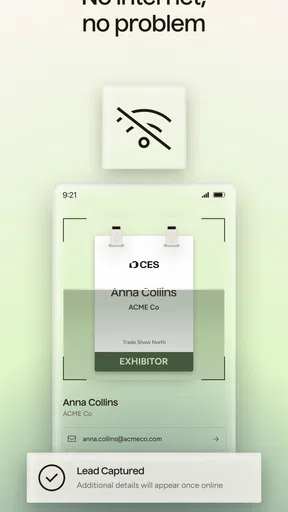
- Requires internet for optimal performance.
- Occasional syncing delays reported.
- Initial setup can be a bit complex.
- Customer support response time varies.
FAQs for Popl: AI Lead Capture
What is Popl: AI Lead Capture and how does it work?
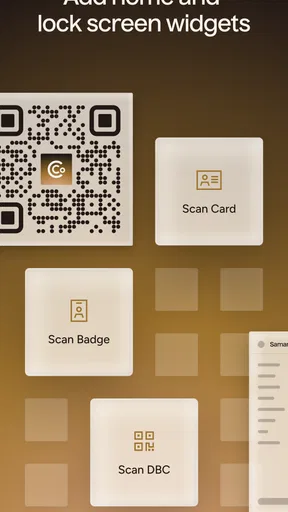
Popl: AI Lead Capture is an innovative app designed to help professionals and businesses streamline the process of capturing and managing leads. The app utilizes AI technology to automatically gather contact information through interactions, such as scanning QR codes or sharing digital business cards. This allows users to efficiently organize and engage with potential clients or partners.
Is Popl: AI Lead Capture secure to use for managing personal information?
Yes, Popl: AI Lead Capture is designed with user security as a top priority. The app employs robust encryption protocols to ensure that personal and business data remains protected. Additionally, Popl regularly updates its security measures to comply with the latest industry standards, providing a safe environment for lead management.
Can I integrate Popl: AI Lead Capture with other CRM tools?
Popl: AI Lead Capture offers seamless integration with popular CRM tools, allowing users to sync their captured leads directly into their existing systems. This functionality helps streamline workflows, reduces manual data entry, and ensures that all lead information is accessible and organized in one place, enhancing productivity and efficiency.
What platforms does Popl: AI Lead Capture support?
Popl: AI Lead Capture is available on both Android and iOS platforms, making it accessible to a wide range of users. The app is designed to provide a smooth user experience on smartphones and tablets, ensuring that users can capture and manage leads effectively, regardless of their preferred device.
Are there any costs associated with using Popl: AI Lead Capture?
Popl: AI Lead Capture offers a variety of pricing plans to accommodate different user needs, including free and premium options. The free version provides basic lead capture features, while the premium plans unlock advanced functionalities, such as enhanced integrations and additional storage. Users can choose a plan that best fits their requirements and budget.


